




Description
Whoxa Chat Script Web WhatsApp Clone NodeJS Website Software
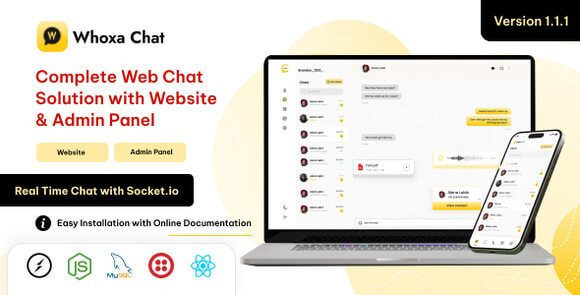
Whoxa is a cutting-edge, web-based communication platform designed to provide a seamless messaging experience similar to WhatsApp. Built using the powerful Node.js framework, this script offers a robust foundation for anyone looking to launch a private or public chat service. Whether you are looking to create a corporate internal communication tool or a social networking site, Whoxa provides the scalability and speed required for modern web applications. It is engineered to handle multiple concurrent connections without compromising on performance.
What is Whoxa Chat Script?
Whoxa is more than just a simple chat script; it is a comprehensive WhatsApp clone that leverages the power of asynchronous programming in Node.js. It allows users to send instant messages, share media, and manage contacts in a familiar interface. The software is optimized for high performance, ensuring that messages are delivered in real-time without latency. By utilizing modern web technologies like Socket.io, Whoxa ensures that your communication platform is both secure and highly responsive across all devices, including desktops, tablets, and smartphones.
Key Features of Whoxa
- Real-Time Messaging: Utilizing Socket.io for instantaneous message delivery and receipt notifications across all connected clients.
- Multimedia Sharing: Users can easily upload and share images, videos, audio files, and documents within the chat interface seamlessly.
- Group Conversations: Create and manage group chats with multiple participants, including admin controls for group settings and member management.
- User Authentication: Secure login and registration system with password encryption and session management to protect user data.
- Profile Customization: Users can update their profiles, upload avatars, and set status messages to personalize their messaging experience.
- Message History: Persistent storage of chat history allowing users to access their previous conversations at any time from any device.
- Responsive Design: A mobile-first UI approach that ensures the application looks great and functions perfectly on any screen size.
- Online Status: Real-time indicators showing when users are currently online or displaying their last seen timestamp.
System Requirements
To run the Whoxa Chat Script effectively, your server environment should meet the following specifications. You will need a VPS or a dedicated server as shared hosting typically does not support the persistent Node.js processes required for real-time applications. Ensure you have Node.js version 14 or higher installed. A database system like MongoDB or MySQL is required for data persistence. Additionally, you will need NPM or Yarn for package management and an SSL certificate to ensure secure data transmission via HTTPS for all user communications.
How to Install Whoxa
Installing the Whoxa script is straightforward for developers familiar with the Node.js ecosystem. First, upload the source code to your server and extract the files into your desired directory. Open your terminal and navigate to the root directory to run the installation command for dependencies using npm install. Next, locate the configuration file (usually a .env file) and input your database credentials and server settings. Once configured, you can build the application and start the server process. It is highly recommended to use a process manager like PM2 to keep the application running in the background and ensure it restarts automatically if the server reboots.
Original Source: Codecanyon
Whoxa Chat Script Web WhatsApp Clone NodeJS Website Software
Whoxa is a high-performance Node.js WhatsApp clone script for building real-time, secure, and scalable web-based messaging applications with ease.

Use Coupon
Hurry and get discounts on all Apple devices up to 20%
ASSET20
₹899.00 Original price was: ₹899.00.₹520.00Current price is: ₹520.00.
- Version
- Last Updated
- Framework
- Demo
- Latest
- December 2025
- Node.js
- Live preview
Payment Methods:

Description
Whoxa Chat Script Web WhatsApp Clone NodeJS Website Software
Whoxa is a cutting-edge, web-based communication platform designed to provide a seamless messaging experience similar to WhatsApp. Built using the powerful Node.js framework, this script offers a robust foundation for anyone looking to launch a private or public chat service. Whether you are looking to create a corporate internal communication tool or a social networking site, Whoxa provides the scalability and speed required for modern web applications. It is engineered to handle multiple concurrent connections without compromising on performance.
What is Whoxa Chat Script?
Whoxa is more than just a simple chat script; it is a comprehensive WhatsApp clone that leverages the power of asynchronous programming in Node.js. It allows users to send instant messages, share media, and manage contacts in a familiar interface. The software is optimized for high performance, ensuring that messages are delivered in real-time without latency. By utilizing modern web technologies like Socket.io, Whoxa ensures that your communication platform is both secure and highly responsive across all devices, including desktops, tablets, and smartphones.
Key Features of Whoxa
- Real-Time Messaging: Utilizing Socket.io for instantaneous message delivery and receipt notifications across all connected clients.
- Multimedia Sharing: Users can easily upload and share images, videos, audio files, and documents within the chat interface seamlessly.
- Group Conversations: Create and manage group chats with multiple participants, including admin controls for group settings and member management.
- User Authentication: Secure login and registration system with password encryption and session management to protect user data.
- Profile Customization: Users can update their profiles, upload avatars, and set status messages to personalize their messaging experience.
- Message History: Persistent storage of chat history allowing users to access their previous conversations at any time from any device.
- Responsive Design: A mobile-first UI approach that ensures the application looks great and functions perfectly on any screen size.
- Online Status: Real-time indicators showing when users are currently online or displaying their last seen timestamp.
System Requirements
To run the Whoxa Chat Script effectively, your server environment should meet the following specifications. You will need a VPS or a dedicated server as shared hosting typically does not support the persistent Node.js processes required for real-time applications. Ensure you have Node.js version 14 or higher installed. A database system like MongoDB or MySQL is required for data persistence. Additionally, you will need NPM or Yarn for package management and an SSL certificate to ensure secure data transmission via HTTPS for all user communications.
How to Install Whoxa
Installing the Whoxa script is straightforward for developers familiar with the Node.js ecosystem. First, upload the source code to your server and extract the files into your desired directory. Open your terminal and navigate to the root directory to run the installation command for dependencies using npm install. Next, locate the configuration file (usually a .env file) and input your database credentials and server settings. Once configured, you can build the application and start the server process. It is highly recommended to use a process manager like PM2 to keep the application running in the background and ensure it restarts automatically if the server reboots.
Original Source: Codecanyon
Reviews
Clear filtersThere are no reviews yet.