




Description
eSchool SaaS School Management System with Student Parents Flutter App
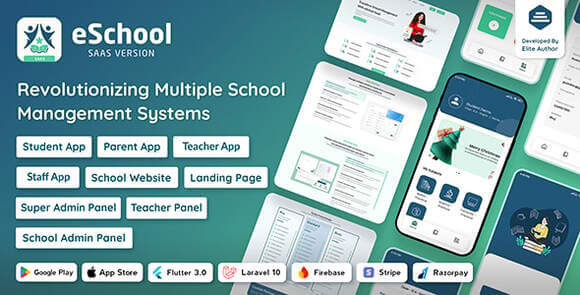
The eSchool SaaS School Management System is a comprehensive, multi-school educational platform designed to bridge the gap between administrators, teachers, students, and parents. This robust solution offers a centralized dashboard to manage multiple educational institutions under a single SaaS umbrella. Whether you are looking to start a subscription-based school management service or need a powerful internal tool for a large school network, eSchool provides all the necessary modules to ensure smooth operations. The system is built with modern technologies to ensure scalability, security, and a seamless user experience across web and mobile platforms.
Key Features of eSchool SaaS
- Multi-School Management: Effortlessly manage multiple schools with individual settings, branding, and data isolation within a single installation.
- Comprehensive Student & Parent Apps: Dedicated Flutter-based mobile applications for students and parents to track attendance, grades, and fees.
- Advanced Fee Management: Automate fee collection, generate invoices, and provide multiple payment gateway options for parents.
- Exam and Result Management: Create exams, record marks, and generate digital report cards that can be accessed instantly by parents.
- Real-time Notifications: Keep everyone informed with push notifications for announcements, attendance alerts, and upcoming events.
- Attendance Tracking: Digital attendance for students and staff with detailed reporting and automated alerts.
- Timetable and Schedule: Manage class schedules, teacher assignments, and exam timetables with an intuitive interface.
System Requirements
To run the eSchool SaaS backend, you will need a web server running PHP 8.1 or higher with MySQL support. The Flutter applications require the latest Flutter SDK for customization and compilation. Standard requirements include BCMath, Ctype, Fileinfo, JSON, Mbstring, OpenSSL, and PDO PHP extensions. A valid SSL certificate is mandatory for secure data transmission and mobile app API connectivity. For hosting, a VPS or dedicated server is recommended for optimal performance when managing multiple schools.
How to Install and Use
Setting up the eSchool SaaS system involves a few straightforward steps. First, upload the backend source code to your hosting server and create a new MySQL database. Run the installation wizard to configure your database credentials and administrative account. Once the backend is live, open the Flutter project in Android Studio or VS Code. Update the configuration file with your backend API URL and app name. After customizing the UI to fit your branding, you can generate the APK or IPA files for distribution on the Play Store or App Store. Administrators can then begin onboarding schools and managing global settings from the super-admin panel.
Original Source: Codecanyon
eSchool SaaS School Management System with Student Parents Flutter App
Manage multiple schools with eSchool SaaS. Includes a powerful admin dashboard and dedicated Flutter apps for students and parents. Scalable & secure.

Use Coupon
Hurry and get discounts on all Apple devices up to 20%
ASSET20
₹999.00 Original price was: ₹999.00.₹800.00Current price is: ₹800.00.
- Version
- Last Updated
- Framework
- Demo
- Latest
- December 2025
- Flutter
- Live preview
Payment Methods:

Description
eSchool SaaS School Management System with Student Parents Flutter App
The eSchool SaaS School Management System is a comprehensive, multi-school educational platform designed to bridge the gap between administrators, teachers, students, and parents. This robust solution offers a centralized dashboard to manage multiple educational institutions under a single SaaS umbrella. Whether you are looking to start a subscription-based school management service or need a powerful internal tool for a large school network, eSchool provides all the necessary modules to ensure smooth operations. The system is built with modern technologies to ensure scalability, security, and a seamless user experience across web and mobile platforms.
Key Features of eSchool SaaS
- Multi-School Management: Effortlessly manage multiple schools with individual settings, branding, and data isolation within a single installation.
- Comprehensive Student & Parent Apps: Dedicated Flutter-based mobile applications for students and parents to track attendance, grades, and fees.
- Advanced Fee Management: Automate fee collection, generate invoices, and provide multiple payment gateway options for parents.
- Exam and Result Management: Create exams, record marks, and generate digital report cards that can be accessed instantly by parents.
- Real-time Notifications: Keep everyone informed with push notifications for announcements, attendance alerts, and upcoming events.
- Attendance Tracking: Digital attendance for students and staff with detailed reporting and automated alerts.
- Timetable and Schedule: Manage class schedules, teacher assignments, and exam timetables with an intuitive interface.
System Requirements
To run the eSchool SaaS backend, you will need a web server running PHP 8.1 or higher with MySQL support. The Flutter applications require the latest Flutter SDK for customization and compilation. Standard requirements include BCMath, Ctype, Fileinfo, JSON, Mbstring, OpenSSL, and PDO PHP extensions. A valid SSL certificate is mandatory for secure data transmission and mobile app API connectivity. For hosting, a VPS or dedicated server is recommended for optimal performance when managing multiple schools.
How to Install and Use
Setting up the eSchool SaaS system involves a few straightforward steps. First, upload the backend source code to your hosting server and create a new MySQL database. Run the installation wizard to configure your database credentials and administrative account. Once the backend is live, open the Flutter project in Android Studio or VS Code. Update the configuration file with your backend API URL and app name. After customizing the UI to fit your branding, you can generate the APK or IPA files for distribution on the Play Store or App Store. Administrators can then begin onboarding schools and managing global settings from the super-admin panel.
Original Source: Codecanyon
Reviews
Clear filtersThere are no reviews yet.