




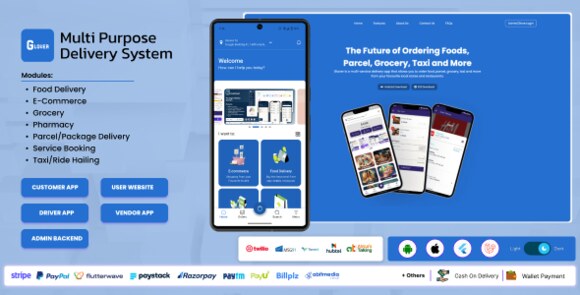
Description
GLOVER Multi-Service Super App Platform
GLOVER is a comprehensive, high-performance multi-service super app platform designed to help entrepreneurs and businesses launch their own on-demand service ecosystem. In today’s fast-paced digital economy, users prefer the convenience of having multiple services—such as food delivery, grocery shopping, parcel logistics, and professional home services—all within a single, unified application. GLOVER provides exactly that, offering a robust Flutter-based mobile experience paired with a powerful Laravel backend.
What is GLOVER Multi-Service Super App?
GLOVER is more than just a delivery script; it is a complete business solution. It allows you to manage a diverse range of service categories from a centralized dashboard. Whether you want to compete with giants like Gojek or Grab, or you want to start a niche local delivery service, GLOVER provides the scalability and flexibility required to succeed. The platform includes apps for customers, delivery drivers, and vendors, ensuring a smooth workflow for all stakeholders involved in the transaction process.
Key Features of GLOVER
- Multi-Vendor Ecosystem: Support for unlimited vendors across various categories including food, pharmacy, and retail.
- Service Booking: Integrated module for on-demand professional services like plumbing, cleaning, or beauty treatments.
- Real-Time Tracking: Advanced GPS integration for live tracking of orders and delivery personnel.
- Multiple Payment Options: Pre-integrated with popular gateways like Stripe, PayPal, and Paystack for global and local payments.
- Wallet & Earnings System: Comprehensive financial management for users, vendors, and drivers with withdrawal requests.
- Dynamic UI/UX: A modern, clean, and intuitive interface built with Flutter for both Android and iOS platforms.
Technical Requirements
To deploy the GLOVER platform successfully, you will need a web server (VPS recommended) running PHP 8.1 or higher. The backend is built on the Laravel framework, requiring a MySQL database. For the mobile applications, you will need the Flutter SDK installed on your development machine to customize and build the APK and IPA files. Additionally, a Google Maps API key is essential for location-based services and Firebase configuration for push notifications.
How to Install GLOVER
The installation process begins with setting up the backend. Upload the source code to your server’s root directory and access the installation wizard via your browser. Follow the prompts to connect your database and configure your admin credentials. Once the backend is live, open the Flutter project in your preferred IDE, update the base URL to match your server, and configure the package name. After testing the app in an emulator, you can generate the build files for deployment to the Google Play Store and Apple App Store.
Original Source: Codecanyon
GLOVER Multi-Service Super App Platform
Launch your own multi-service super app with GLOVER. Features delivery, services, and more in one powerful Flutter-based platform.

Use Coupon
Hurry and get discounts on all Apple devices up to 20%
ASSET20
₹990.00 Original price was: ₹990.00.₹490.00Current price is: ₹490.00.
- Version
- Last Updated
- Framework
- Demo
- Latest
- June 2026
- Flutter
- Live preview
Payment Methods:

Description
GLOVER Multi-Service Super App Platform
GLOVER is a comprehensive, high-performance multi-service super app platform designed to help entrepreneurs and businesses launch their own on-demand service ecosystem. In today’s fast-paced digital economy, users prefer the convenience of having multiple services—such as food delivery, grocery shopping, parcel logistics, and professional home services—all within a single, unified application. GLOVER provides exactly that, offering a robust Flutter-based mobile experience paired with a powerful Laravel backend.
What is GLOVER Multi-Service Super App?
GLOVER is more than just a delivery script; it is a complete business solution. It allows you to manage a diverse range of service categories from a centralized dashboard. Whether you want to compete with giants like Gojek or Grab, or you want to start a niche local delivery service, GLOVER provides the scalability and flexibility required to succeed. The platform includes apps for customers, delivery drivers, and vendors, ensuring a smooth workflow for all stakeholders involved in the transaction process.
Key Features of GLOVER
- Multi-Vendor Ecosystem: Support for unlimited vendors across various categories including food, pharmacy, and retail.
- Service Booking: Integrated module for on-demand professional services like plumbing, cleaning, or beauty treatments.
- Real-Time Tracking: Advanced GPS integration for live tracking of orders and delivery personnel.
- Multiple Payment Options: Pre-integrated with popular gateways like Stripe, PayPal, and Paystack for global and local payments.
- Wallet & Earnings System: Comprehensive financial management for users, vendors, and drivers with withdrawal requests.
- Dynamic UI/UX: A modern, clean, and intuitive interface built with Flutter for both Android and iOS platforms.
Technical Requirements
To deploy the GLOVER platform successfully, you will need a web server (VPS recommended) running PHP 8.1 or higher. The backend is built on the Laravel framework, requiring a MySQL database. For the mobile applications, you will need the Flutter SDK installed on your development machine to customize and build the APK and IPA files. Additionally, a Google Maps API key is essential for location-based services and Firebase configuration for push notifications.
How to Install GLOVER
The installation process begins with setting up the backend. Upload the source code to your server’s root directory and access the installation wizard via your browser. Follow the prompts to connect your database and configure your admin credentials. Once the backend is live, open the Flutter project in your preferred IDE, update the base URL to match your server, and configure the package name. After testing the app in an emulator, you can generate the build files for deployment to the Google Play Store and Apple App Store.
Original Source: Codecanyon
Reviews
Clear filtersThere are no reviews yet.