



Description
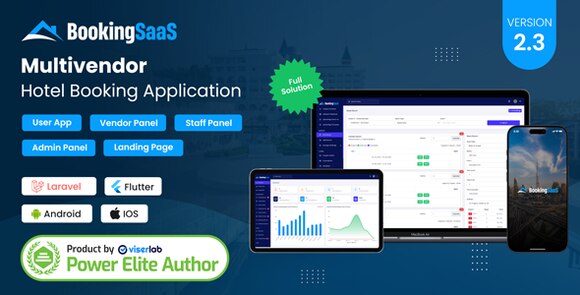
BookingSaaS Complete MultiVendor Hotel Booking Application SAAS
What is BookingSaaS?
BookingSaaS is a robust and scalable multi-vendor hotel booking application designed specifically for entrepreneurs who want to start their own Software as a Service (SaaS) platform. This comprehensive solution allows multiple hotel owners and property managers to register, list their accommodations, and manage bookings through a centralized marketplace. Whether you are looking to build a local hotel directory or a global booking giant, BookingSaaS provides the infrastructure needed to handle complex transactions, vendor management, and user reservations seamlessly. The platform is built with modern technologies to ensure high performance, security, and a user-friendly experience for both administrators and end-users.
Key Features of BookingSaaS
- Multi-Vendor Support: Allow multiple property owners to sign up and manage their own listings, pricing, and availability.
- Subscription Plans: Create various SaaS membership tiers for vendors with different limits on listings and features.
- Advanced Booking Engine: Real-time availability checking and instant booking confirmation for guests.
- Comprehensive Admin Dashboard: A powerful control panel for the site owner to manage vendors, users, payments, and site settings.
- Vendor Management Portal: Dedicated dashboard for hotel owners to track earnings, manage rooms, and view booking history.
- Responsive Design: Fully optimized for desktops, tablets, and smartphones to ensure a smooth booking process on any device.
- Multiple Payment Gateways: Integrated support for popular payment processors to handle global transactions securely.
- Review and Rating System: Built-in feedback mechanism to build trust between guests and property owners.
System Requirements
To ensure optimal performance of the BookingSaaS application, your server should meet the following technical requirements. It is recommended to use a VPS or dedicated hosting for SaaS applications. You will need PHP version 8.1 or higher, a MySQL database (version 5.7+), and the BCMath, Ctype, Fileinfo, JSON, Mbstring, OpenSSL, PDO, and Tokenizer PHP extensions enabled. Additionally, an Apache or Nginx web server with URL rewriting capabilities is necessary for the application to function correctly.
How to Install BookingSaaS
Installing BookingSaaS is a straightforward process. First, upload the provided source files to your web server’s root directory or a specific subdomain. Create a new MySQL database and a user with full privileges through your hosting control panel. Navigate to your website URL in a browser to launch the automated web installer. Follow the on-screen instructions to verify server requirements, enter your database credentials, and set up your administrative account. Once the installation is complete, make sure to delete the installation folder for security purposes. You can then log in to the admin panel to configure your SaaS plans and start onboarding vendors.
Original Source: Codecanyon
BookingSaaS Complete MultiVendor Hotel Booking Application SAAS
Launch your own multi-vendor hotel booking marketplace with BookingSaaS. A complete SaaS solution for property management and reservations.

Use Coupon
Hurry and get discounts on all Apple devices up to 20%
ASSET20
₹999.00 Original price was: ₹999.00.₹800.00Current price is: ₹800.00.
- Version
- Last Updated
- Framework
- Demo
- Latest
- September 2025
- Laravel
- Live preview
Payment Methods:

Description
BookingSaaS Complete MultiVendor Hotel Booking Application SAAS
What is BookingSaaS?
BookingSaaS is a robust and scalable multi-vendor hotel booking application designed specifically for entrepreneurs who want to start their own Software as a Service (SaaS) platform. This comprehensive solution allows multiple hotel owners and property managers to register, list their accommodations, and manage bookings through a centralized marketplace. Whether you are looking to build a local hotel directory or a global booking giant, BookingSaaS provides the infrastructure needed to handle complex transactions, vendor management, and user reservations seamlessly. The platform is built with modern technologies to ensure high performance, security, and a user-friendly experience for both administrators and end-users.
Key Features of BookingSaaS
- Multi-Vendor Support: Allow multiple property owners to sign up and manage their own listings, pricing, and availability.
- Subscription Plans: Create various SaaS membership tiers for vendors with different limits on listings and features.
- Advanced Booking Engine: Real-time availability checking and instant booking confirmation for guests.
- Comprehensive Admin Dashboard: A powerful control panel for the site owner to manage vendors, users, payments, and site settings.
- Vendor Management Portal: Dedicated dashboard for hotel owners to track earnings, manage rooms, and view booking history.
- Responsive Design: Fully optimized for desktops, tablets, and smartphones to ensure a smooth booking process on any device.
- Multiple Payment Gateways: Integrated support for popular payment processors to handle global transactions securely.
- Review and Rating System: Built-in feedback mechanism to build trust between guests and property owners.
System Requirements
To ensure optimal performance of the BookingSaaS application, your server should meet the following technical requirements. It is recommended to use a VPS or dedicated hosting for SaaS applications. You will need PHP version 8.1 or higher, a MySQL database (version 5.7+), and the BCMath, Ctype, Fileinfo, JSON, Mbstring, OpenSSL, PDO, and Tokenizer PHP extensions enabled. Additionally, an Apache or Nginx web server with URL rewriting capabilities is necessary for the application to function correctly.
How to Install BookingSaaS
Installing BookingSaaS is a straightforward process. First, upload the provided source files to your web server’s root directory or a specific subdomain. Create a new MySQL database and a user with full privileges through your hosting control panel. Navigate to your website URL in a browser to launch the automated web installer. Follow the on-screen instructions to verify server requirements, enter your database credentials, and set up your administrative account. Once the installation is complete, make sure to delete the installation folder for security purposes. You can then log in to the admin panel to configure your SaaS plans and start onboarding vendors.
Original Source: Codecanyon
Reviews
Clear filtersThere are no reviews yet.