



Description
Gencio Marketing and Digital Agency HTML Template
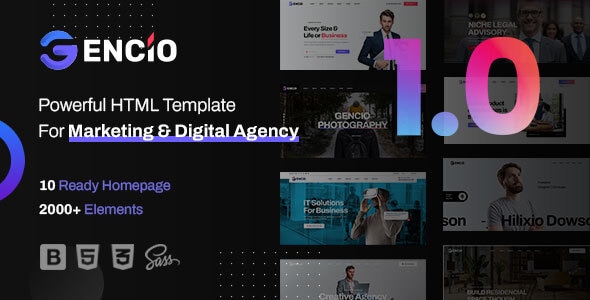
Gencio is a premium, modern, and highly responsive HTML template designed specifically for digital marketing agencies, SEO specialists, creative studios, web development firms, and corporate consulting businesses. Built with the latest design trends and web standards, Gencio offers a stunning visual experience that helps your agency stand out in the highly competitive digital landscape.
Whether you want to showcase your portfolio, detail your marketing services, or generate high-quality leads, this template provides all the essential sections and UI elements to build a professional website quickly. It is fully responsive, ensuring your site looks flawless on desktops, tablets, and mobile devices.
Key Features of Gencio HTML Template
- Modern & Clean Design: A visually striking layout crafted to capture user attention and build brand credibility.
- Bootstrap Framework: Built on the highly popular Bootstrap grid system, ensuring seamless responsiveness and mobile-first design.
- W3C Validated Code: Clean, well-commented, and standard-compliant HTML5 and CSS3 code for optimal performance.
- SEO Optimized: Structured with clean hierarchy and semantic elements to help your website rank better on search engines.
- Cross-Browser Compatibility: Extensively tested on all major browsers, including Google Chrome, Mozilla Firefox, Safari, and Microsoft Edge.
- Interactive Elements: Includes smooth transition effects, modern animations, and functional contact forms to enhance user engagement.
System Requirements
To use and customize the Gencio HTML template, you will need:
- A modern web browser (Google Chrome, Firefox, Safari, or Edge) for previewing.
- A code/text editor such as Visual Studio Code, Sublime Text, or Notepad++ for customization.
- A web hosting account and domain name to publish your website live.
- Basic knowledge of HTML, CSS, and Bootstrap.
How to Install and Customize
Setting up your agency website with Gencio is straightforward. Follow these simple steps:
- Download and extract the Gencio template ZIP file on your local computer.
- Open the extracted folder to locate the HTML, CSS, JS, and image assets.
- Open the
index.htmlfile in your preferred code editor to start modifying the homepage content. - Customize the text, images, and links across all HTML pages to match your agency’s branding.
- Once customization is complete, upload all files and folders to your web server’s public directory (usually public_html) using an FTP client or your hosting cPanel File Manager.
Original Source: Codecanyon
Gencio Marketing and Digital Agency HTML Template
Gencio is a premium, responsive HTML template designed for digital marketing agencies, SEO firms, and creative studios to showcase their services.

Use Coupon
Hurry and get discounts on all Apple devices up to 20%
ASSET20
₹700.00 Original price was: ₹700.00.₹560.00Current price is: ₹560.00.
- Version
- Last Updated
- Framework
- Demo
- Latest
- June 2026
- Bootstrap
- Live preview
Payment Methods:

Description
Gencio Marketing and Digital Agency HTML Template
Gencio is a premium, modern, and highly responsive HTML template designed specifically for digital marketing agencies, SEO specialists, creative studios, web development firms, and corporate consulting businesses. Built with the latest design trends and web standards, Gencio offers a stunning visual experience that helps your agency stand out in the highly competitive digital landscape.
Whether you want to showcase your portfolio, detail your marketing services, or generate high-quality leads, this template provides all the essential sections and UI elements to build a professional website quickly. It is fully responsive, ensuring your site looks flawless on desktops, tablets, and mobile devices.
Key Features of Gencio HTML Template
- Modern & Clean Design: A visually striking layout crafted to capture user attention and build brand credibility.
- Bootstrap Framework: Built on the highly popular Bootstrap grid system, ensuring seamless responsiveness and mobile-first design.
- W3C Validated Code: Clean, well-commented, and standard-compliant HTML5 and CSS3 code for optimal performance.
- SEO Optimized: Structured with clean hierarchy and semantic elements to help your website rank better on search engines.
- Cross-Browser Compatibility: Extensively tested on all major browsers, including Google Chrome, Mozilla Firefox, Safari, and Microsoft Edge.
- Interactive Elements: Includes smooth transition effects, modern animations, and functional contact forms to enhance user engagement.
System Requirements
To use and customize the Gencio HTML template, you will need:
- A modern web browser (Google Chrome, Firefox, Safari, or Edge) for previewing.
- A code/text editor such as Visual Studio Code, Sublime Text, or Notepad++ for customization.
- A web hosting account and domain name to publish your website live.
- Basic knowledge of HTML, CSS, and Bootstrap.
How to Install and Customize
Setting up your agency website with Gencio is straightforward. Follow these simple steps:
- Download and extract the Gencio template ZIP file on your local computer.
- Open the extracted folder to locate the HTML, CSS, JS, and image assets.
- Open the
index.htmlfile in your preferred code editor to start modifying the homepage content. - Customize the text, images, and links across all HTML pages to match your agency’s branding.
- Once customization is complete, upload all files and folders to your web server’s public directory (usually public_html) using an FTP client or your hosting cPanel File Manager.
Original Source: Codecanyon
Reviews
Clear filtersThere are no reviews yet.